Read the room at a glance, live on your phone
Big gauges for the tempo, the energy and the dance floor, so you can see what the room is doing and play to it. Open a private link on your phone and the numbers move with your set.
The cockpit link comes from the show: open the DJ tab and make a DJ Cockpit link.
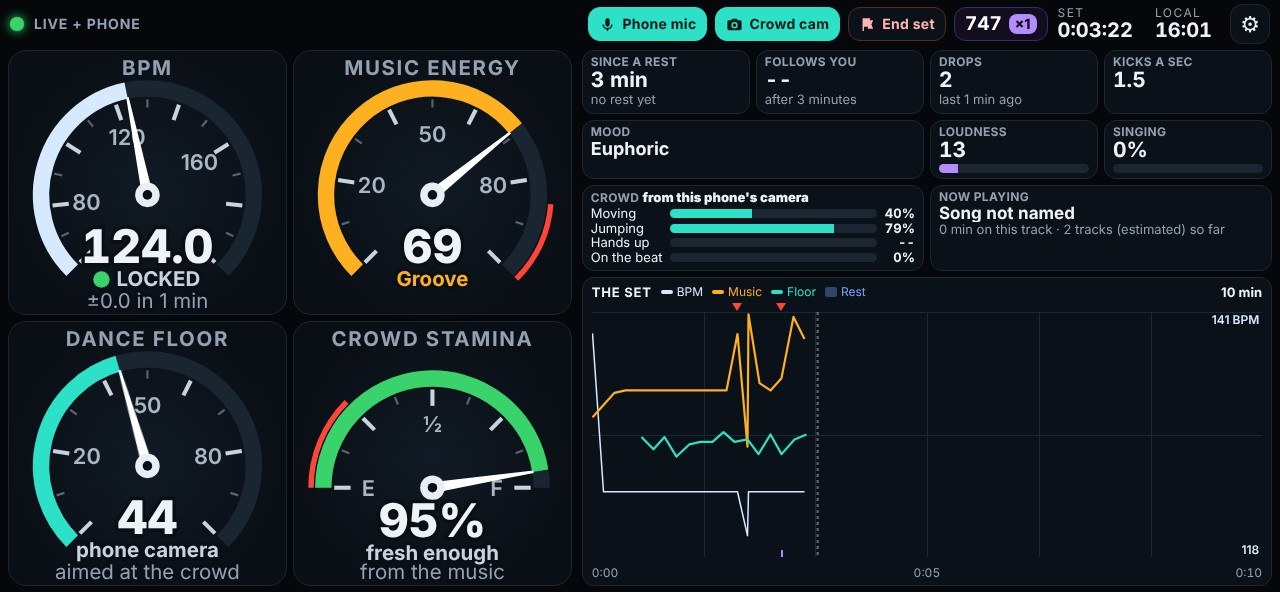
Every number a DJ wants, in one look
BPM, locked
The tempo of what is playing, with a lock light when the beat is steady.
Music energy
How hard the music is hitting right now, and which part of the track you are in, from the intro to the drop.
Dance floor
How much the crowd is moving, measured by a phone camera aimed at the floor.
Crowd stamina
How much the room has left, so you know when to give them a rest and when to push.
Drops, mood and more
The drops so far, kicks a second, the mood of the music, the loudness, the singing and the time since the last rest.
The crowd, move by move
Moving, jumping, hands up and on the beat, read from the camera.
The set graph
Your whole set on one timeline: the tempo, the music, the floor and the rests, with every drop marked.
Your score
At the end of a set you get a score and a level, from Opener to Legend, and a place on the weekly DJ scoreboard.
Set up in under a minute
Make the link
On the laptop running the show, open the DJ tab and press Create DJ Cockpit link.
Open it on your phone
Open the link on your phone. Add it to your home screen if you like.
Play
The gauges move with your set. Turn on Phone mic or Crowd cam to read the room from where you stand.
Numbers only, never pictures or sound
Numbers, not pictures
The show sends the cockpit numbers only: never a picture and never any sound.
Your phone keeps its own
The phone's microphone and camera are worked out on the phone itself, and nothing from them leaves it.
A private link
Each link is a long random address, so only the people you send it to can open it. The link ends when the host stops it.
Pair it with the DJ Decks
Mix your own tracks on two decks in the browser, with Auto-mix and the lights on every drop.
See the DJ DecksFree with LaserVisualizer
The DJ Cockpit comes with the show: free for 90 minutes of show a day, 180 when you sign up free. A pass or plan gives longer parties.
See passes and plansDJ Cockpit questions
Do I need an app?
No. The cockpit opens in the browser on your phone, and you can add it to your home screen like an app.
Do I need the LaserVisualizer show running?
Yes. The cockpit shows the numbers from a show that is running on a laptop. The host makes the link in the DJ tab, and the cockpit follows that show live.
Can more than one phone watch?
Yes. Up to 10 phones can follow one link.
Does it record the party?
No. The cockpit gets numbers only. If you turn on Phone mic or Crowd cam, the sound and the picture are worked out on your phone and never leave it.
Is it free?
Yes. It comes with LaserVisualizer: free for 90 minutes of show a day, or 180 when you sign up free.
Put the cockpit in your pocket
Start the show, make a DJ Cockpit link and open it on your phone.
Start the show